


Easy Hyundai Key Fob Programming Steps Explained
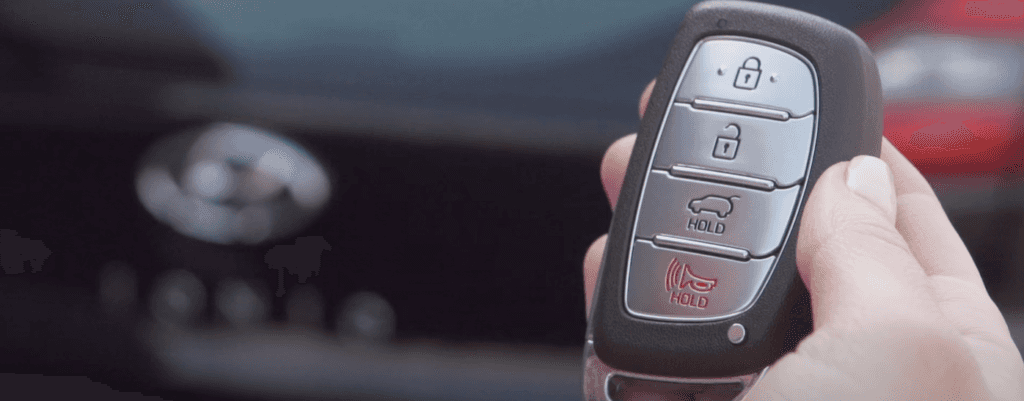
Photo Credit: Hyundai
🔑 Quick & Simple Steps: How to Program Your Hyundai Key Fob for Total Convenience
Losing a key fob, dealing with a dead battery, or simply wanting a spare shouldn’t mean losing access to your Hyundai’s keyless entry perks. Your Hyundai key fob is a gateway to true convenience—offering features like remote lock/unlock, trunk release, and panic alarm—and ensuring it’s always functioning is very important.
For many older Hyundai models, programming a new or replacement key fob is a surprisingly simple DIY process you can do at home. However, it is important to know that newer, more secure smart-key systems (especially 2017–2025 push-start models) often require specialized dealer equipment. This guide will walk you through the common at-home steps and what to do if it fails, keeping your keyless entry system working perfectly.
Understanding Your Hyundai Key Fob
Your key fob communicates with your vehicle’s computer via secure radio signals. When you press a button, a unique code is sent, triggering an action.
Standard Key Fob Features:
- Lock/Unlock doors
- Trunk or hatch release
- Panic Button for security
- Remote Start (on equipped models)
When is Reprogramming Needed?
- After replacing the battery (the most common reason).
- Adding a new or additional fob.
- When a fob stops working unexpectedly.
✅ Pre-Programming Checklist
Before you begin the programming process for your Hyundai, collect these essentials:
- Your Hyundai vehicle nearby.
- The new key fob you wish to program.
- The existing key fob (if required by your model).
- Your Owner’s Manual for model-specific details.
- Fresh batteries installed in the new fob.
🚗 Step-by-Step Programming Instructions (For Older Models)
This common DIY procedure works for many older, keyed-ignition Hyundai models:
- Prep the Vehicle: Sit in the driver’s seat and make sure all doors are closed.
- Turn the Ignition: Insert your key into the ignition and turn it to the ACC (Accessory) position. For push-start models, tap the start button once without pressing the brake.
- Activate Programming: Press and hold the Unlock or Open button on the key fob for approximately 15-20 seconds.
- Confirm Signal: Watch for the vehicle’s confirmation signal. This may be the door locks cycling (locking then unlocking) or the exterior lights flashing.
- Finish & Test: Release the button immediately upon confirmation. Turn the ignition to the OFF position to complete programming. Step out and test all key fob functions.
🔋 Opening the Key Fob & Replacing the Battery
The most common reason a fob needs reprogramming is a dead battery.
To replace it:
- Locate the small notch or indent along the side of the fob casing.
- Use a small, flat-head screwdriver or coin to gently pry the two halves apart.
- Carefully lift the circuit board to expose the battery.
- The common battery type for many Hyundai models (like Elantra, Sonata, and Santa Fe) is a CR2032. Ensure the replacement is fresh and correctly positioned.
🛠️ Troubleshooting & Advanced Systems
If your DIY programming attempt fails, check the fob’s battery again and repeat the steps carefully. Always check your Owner’s Manual for specific instructions unique to your model year.
Important Note for Newer Models (2017–2025 Smart Keys): DIY programming often does not work for smart-key systems, especially if you are adding a completely new fob. These systems are highly secure and require a specialized diagnostic tool to sync the fob’s immobilizer chip with the vehicle.
If you are near Webster, NY, the expert technicians at Vision Hyundai Webster have the right tools to program any smart key or keyless entry remote with guaranteed accuracy.
More from Vision Hyundai Webster
How To Choose The Best Hyundai Sedan
Photo Credit: Hyundai Finding the Right Hyundai Sedan Shopping for a traditional car in a market flooded with oversized crossovers isn’t always easy. But if you want sharp fuel economy, lower monthly payments, and easier parking, comparing the latest Hyundai sedan models side-by-side helps you figure out what actually fits your daily commute….
How Reliable is the Hyundai Kona SUV?
Photo Source/Copyright: HYUNDAI Hyundai Kona Reliability: Is It Actually Built to Last If you live anywhere that gets cold, you know our roads don’t mess around. Between unpredictable lake-effect snow, freezing rain, and spring potholes, choosing a subcompact SUV comes down to one big question: will this thing actually hold up over time? If…
2026 Hyundai Santa Fe Interior Size
The 2026 Hyundai Santa Fe is a spacious 3-row SUV designed to make daily drives around Miami more comfortable while giving your family plenty of room for weekend adventures. If you’re researching the Hyundai Santa Fe interior size, the Santa Fe offers a versatile cabin with generous passenger dimensions, practical cargo capacity, and…